Lumino: A Versatile Google Slides Template for Modern Presentations
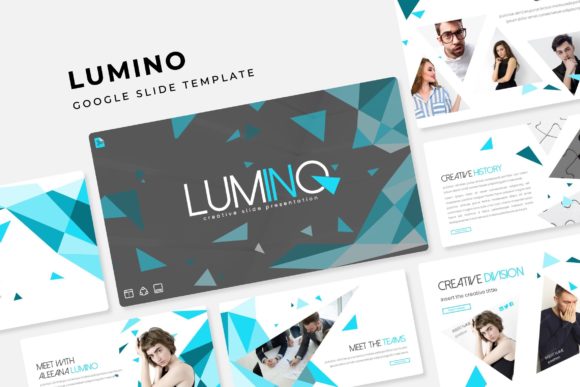
Imagine having a complete design system for your presentations, ready to transform your ideas into polished, professional slides in minutes. The Lumino Google Slide Template offers just that—a comprehensive toolkit designed for creators who value both aesthetics and efficiency.
This isn't just another slide deck; it's a versatile presentation framework built on thoughtful design principles. With over 150 total slides organized into five premade color themes, Lumino provides a robust foundation for any project. Each of the five color variations includes 30 meticulously crafted slides, ensuring visual consistency from start to finish. The collection features handcrafted infographics, dedicated section break slides, and elegant gallery and portfolio layouts, making it ideal for showcasing work, data, or brand stories.
Designed for Flexibility and Professional Polish
One of the standout features of Lumino is its commitment to ease of use. Every graphic element is resizable and editable, built upon a master slide structure. This means you can drag and drop your own content, adjust colors globally, and maintain pixel-perfect alignment without starting from scratch. The picture placeholders are designed for seamless integration, allowing you to insert your own images effortlessly. This level of control is essential for creating a cohesive brand identity, whether you're designing a corporate pitch, an educational lecture, or a creative portfolio.
The template's clean, modern typography serves as a perfect canvas for your message. While it uses its own elegant sans-serif font system, its neutral and balanced style makes it exceptionally easy to pair with other typefaces. Consider combining it with a distinctive display font for headings or a subtle serif for body text to create a unique visual hierarchy. This flexibility makes Lumino a valuable design asset beyond just slides—its components can inspire layouts for social media graphics, poster designs, or even web design mockups.
Practical Applications and Creative Use Cases
Think of Lumino as your secret weapon for a variety of scenarios:
- Brand Presentations: Use the gallery and portfolio slides to showcase brand guidelines, product lines, or client testimonials with a professional flair.
- Data Storytelling: The handcrafted infographics turn complex data into clear, engaging narratives that captivate your audience.
- Educational Material: Structure course content logically with section breaks, making learning modules easy to follow and visually appealing.
- Startup Pitches: Build investor decks that look polished and confident, using the premade color themes to align with your company's branding.
Tips for Maximizing Your Template
To get the most out of a premium template like Lumino, start by selecting the color theme that best matches the mood of your project—whether it's energetic, calm, corporate, or creative. Before adding content, review the master slides to understand the layout options available. This foresight saves time and ensures a more organized build.
Remember, the photographs used in preview images are for demonstration only. You'll want to source your own high-quality images to personalize the template. The included "Readme First" file and free font download links are crucial for setting up your environment correctly, so reviewing them is a recommended first step. By treating the template as a flexible system rather than a rigid set of slides, you unlock its full potential to elevate your presentation design.
Choosing a well-structured presentation template is an investment in clarity and professionalism. It allows you to focus on your story and your audience, confident that the visual foundation is strong, consistent, and designed to impress. Lumino provides that reliable framework, empowering you to deliver your message with impact and style.